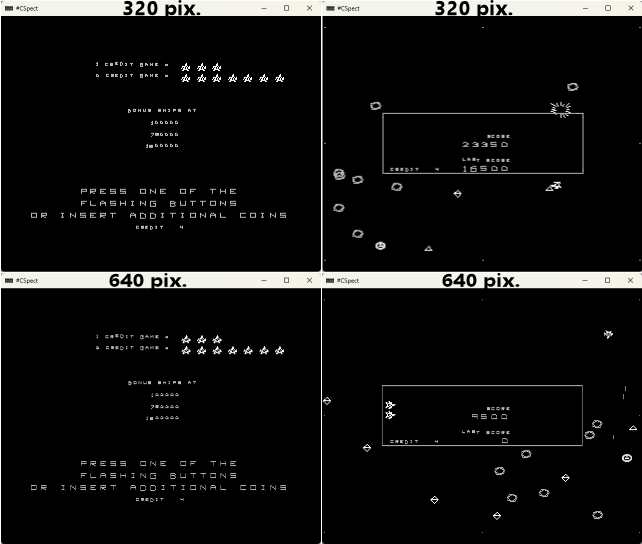
Very little difference between 320×256 mode and 640×256 mode.
While everyone these days are using AI to pump out vibe-coded Spectrum Next games that has more colours, I did the opposite – going for fewer colours, lol.
I will explain why I chose this game, what I did, what I could do different to improve on it, and what I’m going to do with it now.
I love the Midway arcade game, Omega Race, from 1981, so much that I’ve actually remade it twice for Windows. First in 2006 and then in 2009, which was even awarded “Remake of the Month” in issue #66 of Retro Gamer Magazine.
Recently it occurred to me that Omega Race would be a good candidate for a Spectrum Next game, because it has a lot of moving “sprites” (not really sprites, but vector shapes), so using hardware sprites would give me a lot of fast movement for very little processor speed. And with a horizontal resolution of 320 pixels I thought it could make the objects be more detailed than had I done it on a normal Spectrum.
My original idea was to make the rotation of the main ship have 32 positions – that would be close enough to the arcade machine (which has 64 positions), so I planned to manually draw just 8 positions and get the full 360 degrees by mirroring and flipping those 8 frames. Yes, I could’ve used 64 frames too, but I wanted to keep things simple and didn’t really want to draw that many directions.
Firstly, since I wanted the game to be a close representation of the original, I needed to know how big the sprite/shapes was going to be, so I took some screendumps from MAME and resized them. And oh dear, the player ship (and enemy shapes too) had to be about 10*10 pixels in size. That’s not much and won’t allow for much detail.
At this point I decided, that after having seen many vibe-coded projects on Facebook – and since the Spectrum Next can actually push a lot of pixels around, it would probably not be necessary to use hardware sprites (or drawing them individually) – perhaps the Next could actually manage all the calculations and just do it with pure vector graphics?
So the project now changed from “I will manually code it, perhaps helped by AI” to “Screw it, let me just see if AI can do everything“.
I wrote the project description that I would upload to Claude – about 1.6 KB, and then I let Claude loose.
After 45 minutes I had to answer a few questions.
20 minutes later I had the first version.
It seemed way too slow, so I asked for some changes. It admitted it had screwed up and about 15 minutes later I had a fully functioning version running in 320*256. Impressively the Next handles all the math pretty well.
It occurred to me that the game might benefit from using the 640×256 mode, so I asked for that too and 20 minutes later I had a new version for that as well, but it’s surprisingly hard to see the difference between those two versions (unless Claude screwed that up too).
In the end it ended up being a straight conversion of the arcade game (including sound, with keys mapped to QAOP & start game with ‘1’). The 320 pixel width version runs quite well most of the time, but does take a hit on the frame rate when lots of things are on the screen. The 640 pixel version looks SLIGHTLY sharper, but at the expense of a slightly lower frame rate. I haven’t bothered to try it out on the real hardware though, only tested in the CSpect emulator, but while the game plays very well, most text in the game is just too small to be read.
Could this version be improved? Well, I could patch the code and make all the text larger, and also add redefinable keys – or even implement hardware sprites, but at the end of the day the graphics will just be too small (imho), so I will call this a fun little experiment and call it a day.
In the end, it ended up not being hand-coded OR vibe-coded but a straight conversion with me as a “director”.
Time spent from start to end: about 2 hours, costing about $35 to do it.
It was a fun little project but it will go no further. This is not the right project to expand on due to the lack of creativity involved, and I can’t see myself wasting more time and money on silly conversions like this. I’d much rather code things from the ground up.
… and if I get the urge to play Omega Race, I will either play the arcade version in MAME – or my own version from 2009 😉
If YOU want to play this version though, you can download it here.